Last updated 5 October 2026.
Haswent now works with MotorCheck, so you can run a trade vehicle history check on any vehicle with a UK registration (cars, vans, motorbikes, motorhomes and more) from inside our dealer management system or ask the AI Assistant on WhatsApp for one, and show the report on your dealer website. The check covers salvage, MOT history, outstanding finance and more. You do not need your own MotorCheck account: each report is added to your monthly Haswent bill, with no joining fee or subscription.
Whether you are buying at auction, taking a part exchange or selling to a customer, you need to know a car’s history before money changes hands. MotorCheck supplies vehicle history reports to dealers and buyers, covering previous damage, taxi use and outstanding finance among other checks.
Salvage and taxi checks
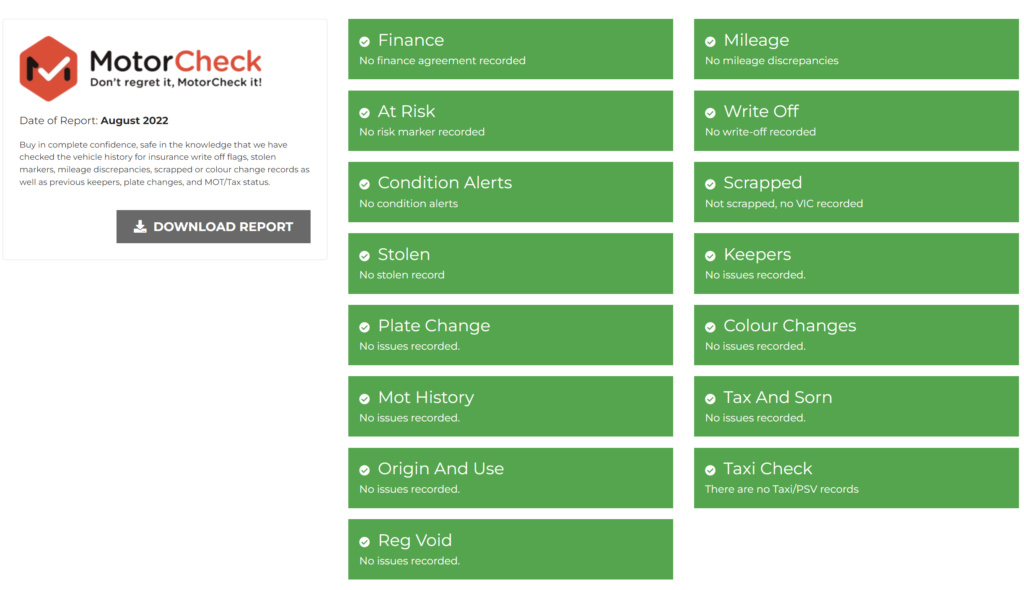
MotorCheck says it is the only trade check service that accurately detects ex-salvage and ex-taxi vehicles. Many standard history checks miss these, and both can change what a car is worth and what you should pay for it. If a car turns out to be an insurance write-off, our guide to Cat S and Cat N explains what the categories mean.
No account, joining fee or subscription
You only pay for the reports you run. There is no MotorCheck account to open, no joining fee and no monthly subscription: each report goes on your monthly Haswent bill at a fixed price, and you see the price before you confirm. It works whether you check five vehicles a month or fifty. If you already have your own MotorCheck account, you can keep using it and MotorCheck bills you directly.
Show reports on your Haswent dealer website
You can put MotorCheck reports on your car dealer website, where customers can view and download them. Buyers who can see a car’s history before they visit are more confident about going ahead.
Run reports in the DMS
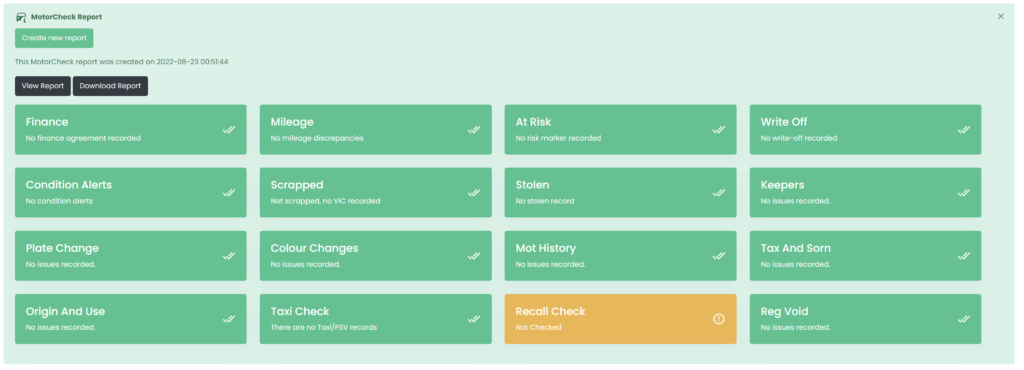
You run a MotorCheck report from the Condition & History tab of any vehicle in the DMS, without logging in to another site. The report is ready in a few seconds, with each check shown at a glance. You can also run one when you look up, value, appraise or part exchange a vehicle, so you can check it before you buy.
Ask the AI Assistant on WhatsApp
At an auction or looking at a part exchange on the forecourt? Ask the Haswent AI Assistant on WhatsApp for a history check on a vehicle in your stock, or give it any registration and mileage. It shows you the price, and once you tap Confirm it sends the PDF report straight to the chat.
The report covers:
- Vehicle identity check: confirms the vehicle details match official records.
- Finance check: shows any outstanding finance on the vehicle.
- Write-off and scrapped (salvage) check: shows whether the vehicle has been written off or scrapped.
- Mileage check: picks up mileage discrepancies.
- Keeper changes: the history of previous keepers.
- Stolen check: shows whether the vehicle has been reported stolen.
- Plate changes: any past registration changes.
- Engine replacement: flags a replaced engine.
- Colour change: shows whether the colour has been changed.
- Road tax check: whether the vehicle is taxed.
- Taxi check: whether the vehicle was used as a taxi.
- Independent valuation: an estimated market value.
- Manufacturer recall check: any outstanding manufacturer recalls.
- MOT check: the vehicle’s MOT history.
What MotorCheck reports do for your dealership
A history report protects you when you buy and reassures your customer when you sell:
- Find hidden problems: previous accidents, salvage status, outstanding finance and stolen markers on part exchanges and auction buys.
- Check before you sell: see the MOT history and any outstanding manufacturer recalls.
- Help customers decide: a history report they can read gives them the confidence to go ahead.
- Fewer returns: buyers who have seen the full history are less likely to bring a car back over something they didn’t know.
- Save time: one report instead of checking several sources by hand.
A history check is one step in a good appraisal. Our vehicle appraisal best practices guide covers the rest.
How to get started with MotorCheck on Haswent
There is nothing to set up:
- Open a vehicle in the dealer management system and go to the Condition & History tab.
- Create a MotorCheck report. You see the price and confirm before it runs.
- Read the results on the vehicle, or download the PDF.
- Show reports on your website if you want buyers to see them.
Prefer your phone? Ask the AI Assistant on WhatsApp instead. For the details and what is saved on each vehicle, see the MotorCheck integration page. Every report you run is kept with the vehicle in your stock records.
MotorCheck in Haswent Meet the AI Assistant