

Remote Vehicle Appraisals

No App Download
Customers complete the appraisal in their phone's browser, with nothing to install
Capture Assist
Assisted image capture with vehicle overlays provided for many vehicle types
Bespoke Branding
The page carries your dealership's logo and colours
Questions
Ask the customer your own set of questions during the appraisal, so you get the answers you need to value the car.



Review it, value it and reply from your DMS
Everything the customer sends lands on the appraisal in your DMS: photos and video on the Media tab, damage and documents together, and their answers under Responses. Open any photo full size to zoom in on the bodywork.
In the UK, Appraise shows AutoTrader's retail, trade, part exchange and private values for the vehicle when AutoTrader is connected, and you can request a CAP HPI valuation (chargeable) alongside them. Enter your valuation and an expiry date, save, and the customer is emailed their offer.
When the customer accepts, Add to Stock creates the vehicle in stock management from its registration with the mileage carried over.
Our guides cover how AutoTrader valuations work for dealers, vehicle appraisal best practices and how to put a car into the trade when a part exchange isn't one for your forecourt.
Frequently Asked Questions
What is a remote vehicle appraisal?
A remote vehicle appraisal allows customers to submit photos, videos and vehicle details from their phone without visiting the dealership. The dealer reviews the submission and provides a valuation, which saves both of you a trip and lets you make a part exchange offer before they visit.
Do customers need to download an app for the appraisal?
No. Haswent's appraisal tool works in the customer's web browser, so there is nothing to download. They open the link and follow the steps.
Can the appraisal tool be branded to my dealership?
Yes. The appraisal page carries your dealership's logo and colours, and asks your own questions. Customers see your branding from start to finish.
How does the guided image capture work?
The appraisal tool displays vehicle overlays on the camera screen, guiding customers to photograph the vehicle from the right angles. You get the same set of clear photos from every customer to value from.
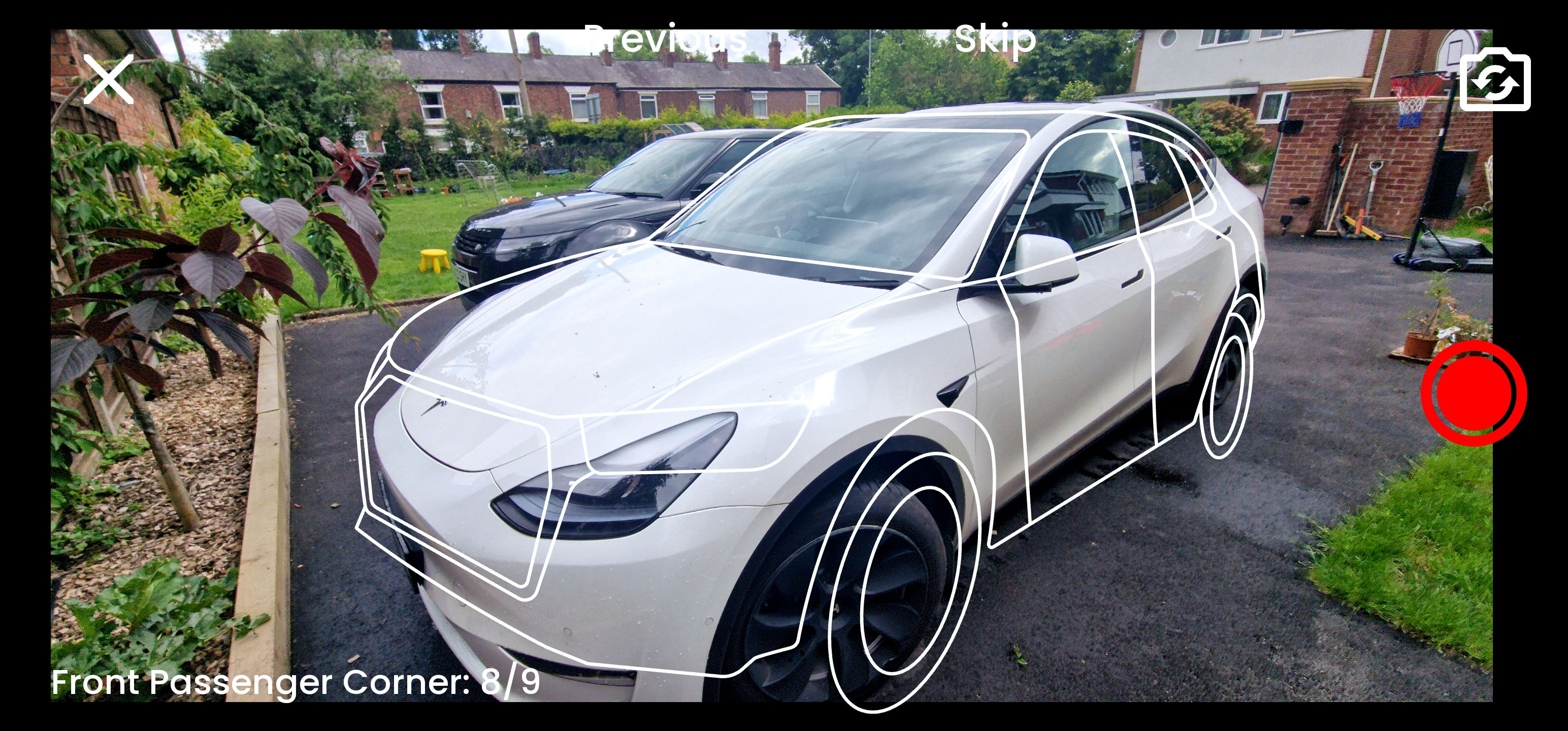
Perfect Pictures, Every Time.
Appraisals walks the customer through photographing their car from each of the angles you need.
Each step tells them which shot to take next, and an outline of the vehicle over the camera view shows them how to frame it. You get every angle, framed the same way, without chasing the customer for missing photos.
Customers can also choose photos already on their phone as well as taking new ones. If you would rather every photo is taken during the appraisal, turn off Allow Uploading Existing Photos under Settings > Appraisals.